JuWeiFan
Wang
FX Artist
Week11 Front shield
Update: 8/21/23
Process Part 1
Aura combine with the trail
the aura doesn't seem very obvious, try to increase the emission and adjust the color.


before


After
Process Part 2
Shield Reference


Combining reference with my own ideas, I don't want the shield too obvious.
Process Part 3
Shield process
use the half of the sphere and make sure it can cover the upper body. and get it the mountain noise(by change the elements size to make it feel like it moving to the backward).

use the divide node. There are two ways to achieve this kind of shape click on the smooth polygon and the change the range or click on the compute dual.
a whole piece become individual pieces
polyextrude adjust the distance and click on the insert scale and for the output back (when click on that it looks not nice in render view)


create vop node and primitive node


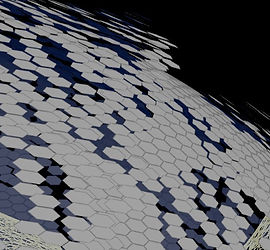
Fluctuation degree can control by the ramp
To control the scale of the sphere. Use the same way to create another vop and primitive node but this time don't change the primitive's pivot translate.

also I hope he gradually dissipates from beginning to end.


base on this result. I need make the object rotate 90 degree and after I finish vop part then rotate back.

before

after
same way to scale down the pieces

For material I also want to add another noise layer. This one not effect scale and position.

before

after
also to create the Alpha channel.

Material Setting

Render Result

diffuse and reflect too mush little bit high
also the alpha channel need to be more darker

the emission need higher and the color need bit lighter.

color right but the alpha still too dense

Final Result
copy to point (hightlight the object), need little bit adjust

before

after
overall the shield's color still need to be adjust and the position should be a bit back


Final Result


Process Part 4
Render Test Whole Body Part
After 94 frame, the element start flying around.
the problem come from the pyro.

I merged upper body trail part and pyro trail part together before. it cause some error.
right now I separate these two part and the render result looks good


the problem comes from volumerasterizeattributes node, still when the voxel size too low(lower than 0.04) it will look like this, also need adjust the emission and the other data because need to make sure after the 90 frame the trail still has the emission part.
also adjust the particle's velocity to make sure it will have more blur


Render Test
After 92 frame the rotation of the trail is to much need adjusts
after adjust simulation result 50-130 frame
Render Result (No ACES When Convert To MP4.)
This one just for the overall look to check all the part is working

With ACES (will be used in Final render)
Process Part 4
Stones Reference
Stone Plain Part


Stone Valley Part


After collecting some references, I plan to divide the stone into two parts for processing. The first part is the large stone with more details. The other type is small stones with fewer details. Firstly, in the plain areas, I plan to scatter more small stones and fewer large ones. For low valley areas near mountains, there are more large stones, and the remaining parts are small stones

the black part I will scatter more small stone, the red part the big stone will scatter more.
the blue will be all the small stone.
Bibliography
Reference
Shield
https://www.youtube.com/watch?v=aOk_qP463QY&t=9s
https://www.youtube.com/watch?v=4NWbMrLIar8
https://www.youtube.com/watch?v=UqI7i7Zvpt0&t=4s
Stone plain
stone valley
Bibliography