JuWeiFan
Wang
FX Artist
Week 6 Fx Progress & RnD
Update: 2/15/23
Click Button To See This Week Result directly
Adjust The Animation
The professor's suggestion is to slow down the speed of animation and make the transition of controller more smooth.
So here is the adjustment.


The Animation Curve, left : rotation, right : transform
The controller animation 's update video.
vellum grain (stable the sand Final )
Base on the early vellum grain result, the grain is not stable. I found out the POP Awaken can be used for wake the particles back up again(in the document).

Next step is to test how the pop awaken effect the vellum grain.
The result :
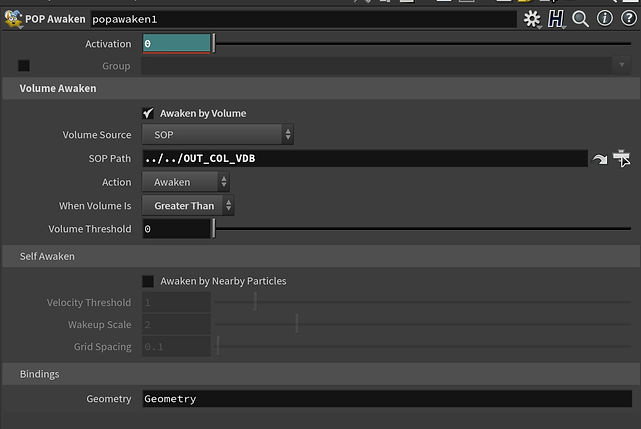
The method is before the controller collide with the grain, The grain will stable until the controller effect the grain.
So I keyframe the activation to make sure the particle will be awaken when the controller is collide with the grain. and when it's not, The vellum's auto sleep will take place to make sure the particle will stay in their place.
The overall setting


Also I found that in the vellum configure grain node, if check on the" adjust radius to avoid overlap". it will also stable the grain.
Stable the grain (update)
The influence on stability is by the order
1.Open the auto sleep(the original data is kind of large, For this project it should lower than that )
2.increase the iteration substeps(the higher the more stable(but not too much it will multiply the simulation time )for my test around 25-35 is good )
3. decrease the voxel size of the vellum grain(for my case lower than 0.002, the grain is become jitter and obviously unstable )
4. customize the attraction weight or the attraction stiffness (or just change the data in vellum solver)[Ps. too much of attraction will make the grain hard to break]
5. change the friction(base on the simulation situation )(for my experience the higher friction the longer time you take to stable the grain )
Old
New(add pop awake)
next week I will add the grain on the whole environment. and add the bump shape on the grain which collide with the controller.